
Skip to Content
  • +1 403-250-6790
HS Food Service
  • 0
  • 0
  • Sign in
  • Contact Us
  • Home
  • Blendtec Program
  • Fast Bake Program
  • Belluci / Saeco
HS Food Service
  • 0
  • 0
    • Home
    • Blendtec Program
    • Fast Bake Program
    • Belluci / Saeco
  • +1 403-250-6790
  • Sign in
  • Contact Us

Xpresschef MXP Firmware

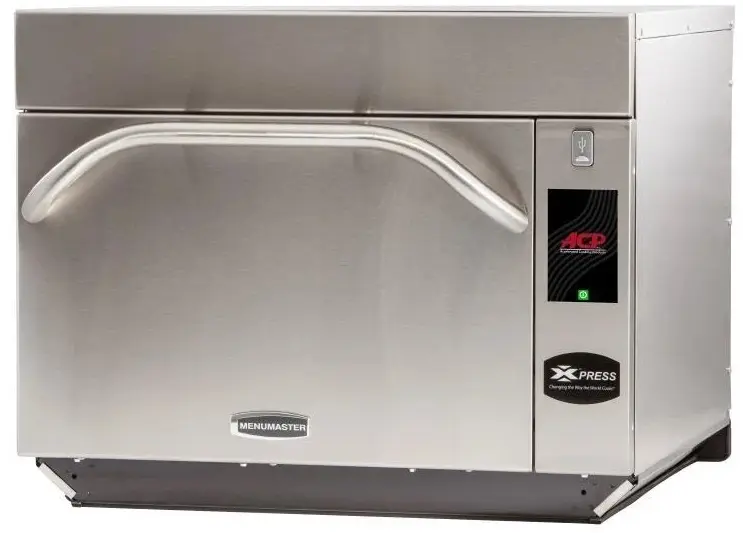
If your oven looks like the picture below, click the Download Firmware button.
  • All Blogs
  • Fast Bake Program
  • Xpresschef MXP Firmware
  • March 24, 2026 by
    Xpresschef MXP Firmware
    Steve Lawrence

    1. Obtain a blank USB drive and insert into a USB port on your computer
    2. Click the "Download Firmware" button below.
    3. Open the zip file after download completes.
    4. Select all the filed in the zip window and copy to the USB from step 1
    5. Unplug the USB from your computer
    6. Unplug oven from power
    7. Insert the USB key into the USB slot at the front of the oven
    8. Plug in the power cord. After a few minutes, you will see a Firmware Update message.
    9. Remove the USB and update your menu following the guide from the "Menu Programming" section above.


    Download Firmware Xpresschef MXP Reboot Key 6.6.5

    in Fast Bake Program

    Designed
    for Speed and Quality

    The programs offered on this page give you unprecedented speed and quality, with little training, prep and cleanup. Fully supported by our team of professionals!

    • Home
    • Contact us
    • Privacy Policy
    • Cookie Policy
    • +1 403-250-6790
    • info@hsdc.ca
    Copyright © Hilton Stone Distribution Corp
    Powered by Odoo - The #1 Open Source eCommerce

    We use cookies to provide you a better user experience on this website. Cookie Policy

    Only essentials I agree